Articles

Install png package in macOsX

1- install Xcode from app store (take care, it is 4 GB !) 2- Open Xcode from application folder and install line command tools 3- Open terminal and enter:  sudo xcodebuild -license 4- Go to the end and enter agree 5- Install macport  https://www.macports.org  (it is simpler to use the .pkg file) or/and update it using: 6- In terminal enter:  sudo port upgrade outdated 7- Enter in terminal:  sudo port install libpng 8- In R, enter: install.packages(pkgs=" http://www.rforge.net/src/contrib/png_0.1-8.tar.gz", repos=NULL) Done
delta method using numerical derivative. An example

The main conclusions are : - Use delta method with or without analytic derivative, it does not change anything - Do not use simple resampling using SD - You can use resampling taking into variance-covariance matrix library(car) m1 <- lm(time ~ t1 + t2, data = Transact) result <- deltaMethod(coef(m1), "t1/t2", vcov.=vcov(m1)) rownames(result) <- "Delta method, analytic derivative" library("nlWaldTest") r <- nlConfint(obj = NULL, texts="b[2]/b[3]", level = 0.95, coeff = coef(m1),           Vcov = vcov(m1), df2 = TRUE, x = NULL) result <- rbind(result, t(as.data.frame(c(Estimate=r[, 1], SE=NA, '2.5 %'=r[, 2], '97.5 %'=r[, 3])))) rownames(result)[2] <- "Delta method, analytic derivative in nlWaldTest" ############# Now numerical derivative is used. The result is the same. try_g <- function(...) {   par <- list(...)   return(par[[1]]/par[[2]]) } r <- nlConfint2(texts="tr...

What is my encoding?

Imagine that you have a file but you don't know what is the encoding. Here is a way to determine it: Let create a file with Excel using the function "Save as" and then choose, Text (separator : tabulation) (.txt) How to read it ? > file.name <- "path to the file" > x <- unlist(lapply(iconvlist(), function(enc) try(read.table(file.name, fileEncoding=enc, nrows=1, header=FALSE, sep="\t"), silent = TRUE))) If the first cell contains Ebodjé for example: > z <- lapply(x, function(y) {y=="ebodjé"}) > which(unlist(z))      CSMACINTOSH              MAC        MACARABIC MACCENTRALEUROPE      MACCROATIAN         MACGREEK               126              330              331              332         ...

Do the next 365 days include a 29 February or not ? Can be used also for: Is the year bissextile or not?

A year is bissextile if it has 366 days. Years that can be divided by 4 are bissextiles except for secular years (ends by 00) except each 400 years. If you have a date in dt variable, just do ifelse(as.POSIXlt(dt+365)$mday== as.POSIXlt(dt)$mday , 365, 366).  It will tell you if  among the 12 months after this date, you had a 29 February: > dt <- as.Date("2005-01-01") >  ifelse(as.POSIXlt(dt+365)$mday==as.POSIXlt(dt)$mday, 365, 366) [1] 365 > dt <- as.Date("2008-01-01") >  ifelse(as.POSIXlt(dt+365)$mday==as.POSIXlt(dt)$mday, 365, 366) [1] 366 > dt <- as.Date("2000-01-01") >  ifelse(as.POSIXlt(dt+365)$mday==as.POSIXlt(dt)$mday, 365, 366) [1] 366 > dt <- as.Date("1900-01-01") >  ifelse(as.POSIXlt(dt+365)$mday==as.POSIXlt(dt)$mday, 365, 366) [1] 365 > dt <- as.Date("1999-07-01") >  ifelse(as.POSIXlt(dt+365)$mday==as.POSIXlt(dt)$mday, 365, 366) [1] 366 > dt <- as.Date(...

Read ... parameters in both function and interactive run

The ... parameter is very useful in a function but at the debugging stage it is boring because it generate an error in direct use. With this line, you will be able to use ... even in direct use without error: p3p <- tryCatch(list(...), error=function(e) list()) Let do some example. If you run this in interactive mode, you will get: > p3p <- tryCatch(list(...), error=function(e) list()) > p3p list() Now let use it within a function: > essai <- function(r, ...) { +   p3p <- tryCatch(list(...), error=function(e) list()) +   return(p3p) + } > essai() list() > essai(k=100) $k [1] 100 Original idea Marc Girondot with amelioration by Bert Gunter <bgunter.4567@gmail.com> and William Dunlap <wdunlap@tibco.com>.

Parallel computing in both windows and Unix computer

In the package parallel, a very useful function is mclapply(); it can be used directly as an lapply() but it runs the code in parallel in different cores. However, do not forget the to set the number of cores to be used because the default is only 2. Then you can do: options(mc.cores = detectCores()) system.time(out <- mclapply(as.list(1:10), FUN=function(x) {x*2})) or directly: system.time(out <- mclapply(as.list(1:10), FUN=function(x) {x*2}, mc.cores =  detectCores() )) However it does not work in Windows because forking cannot be used in windows. In windows you can use: options(cl.cores = detectCores()) cl <- makeCluster(getOption("cl.cores", 2)) # If you must use other package in the parallel function; use # invisible(clusterEvalQ(cl = cl , library(xxxxxx))) system.time(out <- parLapply(cl=cl, X=as.list(1:10), fun=function(x) {x*2})) stopCluster(cl)   Don't forget to stop the cluster before to open another one.

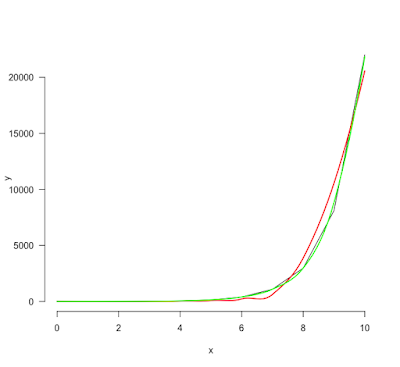
Take care to the span parameter if you use the loess() function

Image
The loess() function permits to interpolate data with very few information about the data that you want interpolate. By default, the smoothing parameter (span) is set to 0.75. However this value is not always ideal. Look at these data. The data are very simple (exp(0:10)) but the span value at 0.75 is clearly not correct. A 0.5 value is much better.