Articles

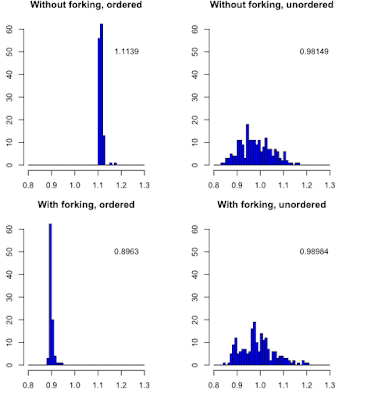
Forking or not for parallel computing
Image
In linux, forking is available when parallel computing is done but not in Windows. But what is the difference ? Let do an exemple (code is below): When the durations of the tasks are unordered, both algorithms are performing identically. However when task durations are ordered, forking is doing much better. library(parallel) l <- (1:32)/10/16.5 sum(l) t0 <- system.time(lapply(l, FUN=function(x) {Sys.sleep(x)}))["elapsed"] cl <- makeCluster(detectCores()) out1 <- NULL; for (i in 1:200) out1 <- c(out1, system.time(parLapplyLB(cl = cl, X = l, fun = function(x) {Sys.sleep(x)}))["elapsed"]) stopCluster(cl) out2 <- NULL; for (i in 1:200) out2 <- c(out2, system.time(mclapply(l, mc.cores =detectCores(), FUN=function(x) {Sys.sleep(x)}))["elapsed"]) cl <- makeCluster(detectCores()) out3 <- NULL; for (i in 1:200) out3 <- c(out3, system.time(parLapplyLB(cl = cl, X = l[sample(32)], fun = function(x) {Sys.sleep(x)})...

Performance of grepl versus more crude method using substr() and ==

I wanted test if the name of parameters begins with max. First I used a rather crude substr(var, begin, length) and then I had a better idea: using grepl. But was the more crude version really the worst ? Here is a little test that permits to use the function microbenchmark in the package of the same name. > times <- microbenchmark( grepl("^max", "max_152"), substr("max_152", 1, 3) == "max", times=1e3) > times Unit: nanoseconds expr min lq mean median uq max neval grepl("^max", "max_152") 3980 4255 4863.691 4539.5 4941.0 30161 1000 substr("max_152", 1, 3) == "max" 995 1205 1492.998 1340.5 1579.5 16659 1000 The returned data frame has the following informations: expr: the tested expressions neval: how many time they have been evaluated min, lq, mean, median, uq, max are respectively the minimum, lower quartile, mean, median, upper quar...

On the error bar and statistical significance

Image
Take two random series of 20 values. What you can tell about their difference according to the visualization of their confidence interval: nearly nothing ! Let use this little script: library(HelpersMG) x <- rnorm(20, mean=11.8, sd=2) y <- rnorm(20, mean=10, sd=2) t <- t.test(x, y, var.equal = TRUE) w <- series.compare(x, y, criterion = c("BIC"), var.equal = TRUE) plot_errbar(x=1:2, y=c(mean(x), mean(y)), errbar.y=1.96*c(sd(x), sd(y)),             las=1, bty="n", xlab="", ylab="", ylim=c(0, 20), xlim=c(0, 3)) plot_errbar(x=(1:2)+0.1, y=c(mean(x), mean(y)), errbar.y=2*c(sd(x)/sqrt(20), sd(y)/sqrt(20)),             las=1, bty="n", xlab="", ylab="", ylim=c(0, 20), xlim=c(0, 3), add=TRUE, col="red",             errbar.col = "red") text(x = 1.5, y=2, labels = paste0("p = ", format(t$p.value, digits = 5))) text(x = 1.5, y=3, labels = paste0("w = ", forma...

Error during packages compilation about -lomp

If you have an error about -lomp, y ou must verify that you have libomp.dylib. The simplest way to do is to in terminal and  activate locate database: sudo /usr/libexec/locate.updatedb This function can be used also to update the database. Then you can do: locate libomp.dylib  | xargs ls -l And the result is for example: -rwxrwxr-x  1 root          admin  508044 26 aoû 22:31 /Library/Frameworks/R.framework/Versions/3.5/Resources/lib/libomp.dylib -r--r--r--  1 marcgirondot  admin  442396 31 jan  2018 /usr/local/Cellar/llvm/5.0.1/lib/libomp.dylib -r--r--r--  1 marcgirondot  admin  491820 12 mar 09:38 /usr/local/Cellar/llvm/6.0.0/lib/libomp.dylib -r--r--r--  1 marcgirondot  admin  495888  6 jul 17:11 /usr/local/Cellar/llvm/6.0.1/lib/libomp.dylib Choose the one that you want (here the first one because it is the most recent), and do: sudo ln -s /Library/Frameworks/R.fr...

Development version of optimx

optimx is a nice replacement of  optim(): install.packages("optimx", repos="http://R-Forge.R-project.org") See  optimx for R - Journal of Statistical Software

Update a package and the dependencies

update.packages(checkBuilt=TRUE, ask=FALSE)

Install rJava in R 3.6 with MacOSX 10.13

Instal homebrew:  https://brew.sh/index_fr In terminal: brew install --with-toolchain llvm in .profile, add: PATH="/usr/local/opt/llvm/bin:${PATH}" LDFLAGS="-L/usr/local/opt/llvm/lib -Wl,-rpath,/usr/local/opt/llvm/lib" CPPFLAGS="-I/usr/local/opt/llvm/include" export LDFLAGS export CPPFLAGS Install the latest java jdk:  http://www.oracle.com/technetwork/java/javase/downloads/jdk8-downloads-2133151.html Look at here:  https://biostatsr.blogspot.fr/2018/02/set-javahome-to-correct-value-in-profile.html In terminal, enter: cd $(/usr/libexec/java_home)/jre/bin/ sudo ln  $(/usr/libexec/java_home) /bin/javac javac sudo ln  $(/usr/libexec/java_home) /bin/javah javah sudo ln  $(/usr/libexec/java_home) /bin/jar jar cd  $(/usr/libexec/java_home)/jre/lib/ sudo ln  $(/usr/libexec/java_home) /lib/tools.jar tools.jar cd $HOME sudo R CMD javareconf And in R install.packages("rJava")